


How to save Habauk wooden toys to a Pinterest gift board
Instead of collecting screenshots and hunting through old messages, save Habauk wooden toys to a Pinterest gift board using Pinterest’s browser extension. You’ll keep each toy’s picture and product link together, ready to revisit or share with family.
- Save Habauk wooden toys to Pinterest board collections with the Pinterest Save Extension, then check each product link.
- Use a secret gift board for private planning; invite collaborators when you want help collecting ideas.
- Save individual product pages rather than shop homepages so relatives can find the toy you chose.
- Pinterest organises gift ideas; it does not reserve toys or track which gifts relatives have bought.
Why this matters
A lovely toy picture is useful inspiration, but a picture without its source leaves someone else doing the searching. Saving the product page gives your family a clearer starting point than a screenshot in a busy group chat.
Habauk is a useful starting point for parents collecting HABA wooden toy gift ideas by age and category. Begin at Habauk, open a toy that interests your child, and save that individual page rather than the shop homepage.
For a birthday or Christmas in 2026, think of the board as a shared shortlist, not a gift registry. It helps everyone see the ideas together, but you still need a separate conversation about who is buying what.
Before you start
- Have your Pinterest account ready. Sign in on a desktop browser and install the official Pinterest Save Extension through your browser’s extension store. Check the publisher before installing, and use a browser that the extension supports.
- Open an individual toy page. Read the age guidance, warnings and description before adding it to your gift ideas. A photograph alone does not establish whether a toy suits your child.
- Choose privacy before sharing. A secret board is for you and the people you invite, not a publicly accessible wish list. Sending its link does not replace inviting someone who needs access.
The main gotcha is the saved destination. An attractive image can still lead to a broad shop page or an unrelated page if you start in the wrong place. Open the exact toy page before using the extension, then test the saved Pin afterwards.
This guide uses the desktop extension as its main route. Pinterest’s app and website arrange controls differently, so follow the named action rather than relying on a button being in one particular corner.
Choose your saving method
Both routes below collect ideas on a Pinterest board. Choose the one that fits where you are browsing; you do not need to use both.
| Method | Best for | What works well | Limitation |
|---|---|---|---|
| Pinterest Save Extension | Parents gathering several ideas on a desktop | Lets you select an image while viewing the original product page | Requires installation and permission to work in your browser |
| Phone sharing menu | Parents collecting an idea while browsing on a phone | Uses the phone’s sharing tools when Pinterest is offered | Pinterest must be installed and enabled as a sharing destination; the route differs by device |
Use the desktop extension for your first save. The larger view makes it easier to check the image, choose the board and open the saved destination before repeating the process.
Your gift board setup
Create the board before collecting toys. A clear name helps you choose the right destination when Pinterest offers several boards during saving.
- Open Pinterest and go to your profile.
- Use the + control for creating content, then choose Board.
- Enter a recognisable board name, such as Family gift ideas 2026. Use the occasion rather than a child’s full name or birth date.
- Turn on Keep this board secret if you want private planning.
- Select Create to finish the board.
Expected result: your new board appears on your profile, ready to receive Pins. Open it and check the name and privacy setting before adding any family details.
Start with 1 board for the occasion. You can add sections later if the ideas become difficult to scan; there is no need to build a filing system before saving the first toy.
For a 2026 family gift board, useful section names include Building ideas, Pretend play and Sound play. These are your own organising labels, not age recommendations or statements about a toy’s suitability.
Your first product Pin
Save one toy and check the whole journey before collecting a longer shortlist. That small check catches the most frustrating problem: a board full of lovely pictures that do not open the intended pages.
- Open the individual toy page in your browser. For a practice save, you can use Fun with Sounds Wooden Discovery Blocks from Habauk’s wooden toy range.
- Read the product information and decide whether the idea belongs on your shortlist. Saving a Pin should follow that check, not replace it.
- Open the Pinterest Save Extension from your browser’s toolbar. If it is hidden, find it in the browser’s extensions menu.
- Select the image that clearly shows the toy. Avoid a shop logo, a related-item thumbnail or a picture that does not match the page you opened.
- Use Save, then choose your gift board in the board picker. Complete the save when Pinterest prompts you.
- Open the board and find the new Pin. Open its linked website and confirm that it takes you back to the intended product page.
Expected result: the board contains a recognisable toy image with a working link to the correct product. Only then repeat the process for another idea.
The saved image does not need to tell the whole story. Its job is to help your family recognise the idea; the linked product page supplies the details they need to read before choosing a gift.
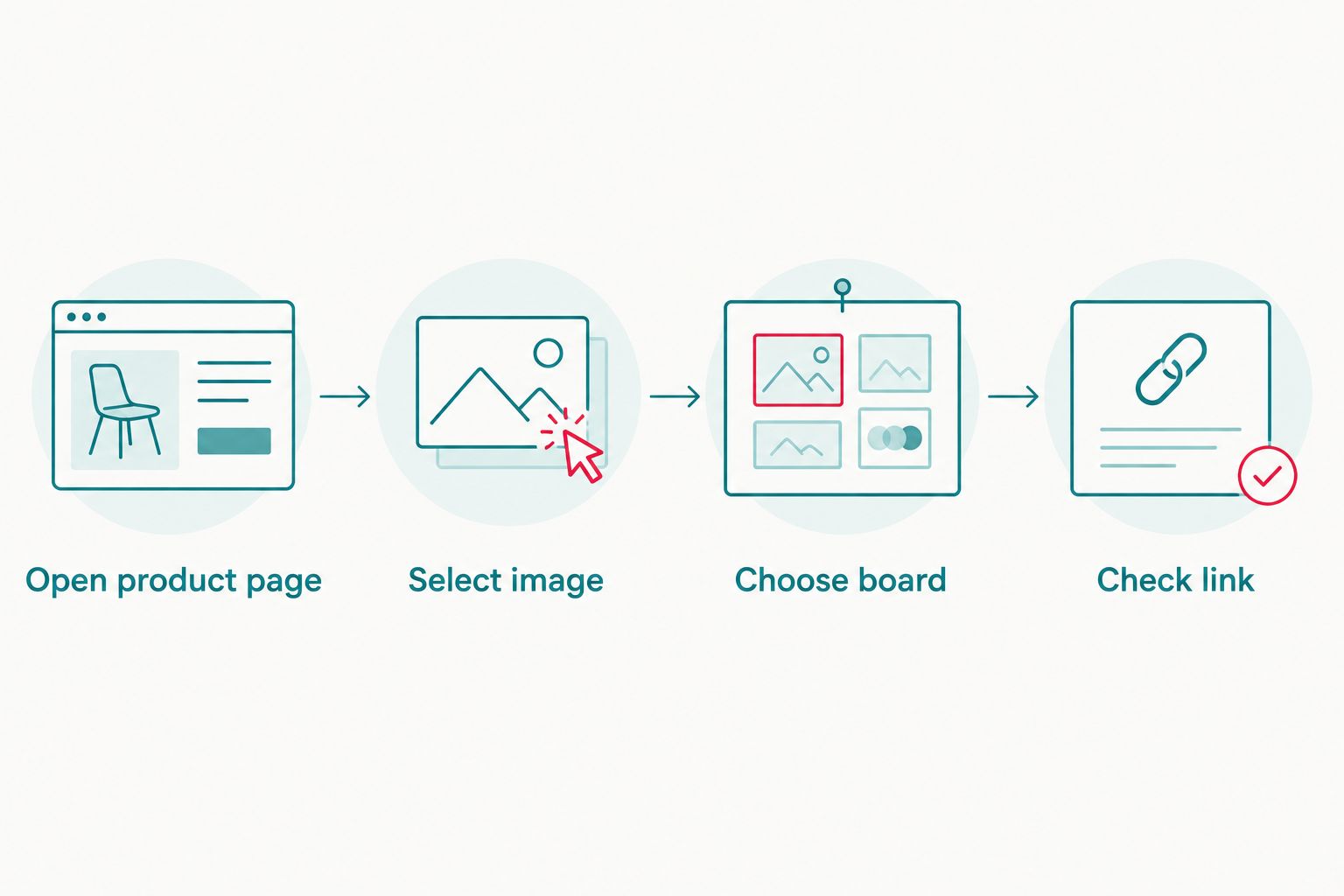
For your next save, follow the same sequence: Open product page, Select image, Choose board, Check link. The checking step matters even when several toys have similar pictures or names.
Your family sharing setup
Decide whether relatives need to browse your choices or help collect them. Collaboration is useful for gathering ideas, but it also means other people can contribute Pins to the board.
- Open the gift board and use the invitation control beside the board’s collaborators.
- Find the person you want to invite, or use the invitation method Pinterest offers for your account.
- Ask the recipient to accept the invitation while signed into their Pinterest account.
- Ask them to open a saved Pin and follow its product link. For a secret board, confirm they can access the board itself as well.
- Explain that adding an idea does not mean someone has agreed to buy it. Use a separate family message to coordinate gift choices.
Expected result: your invited relative can access the board, recognise the toy ideas and open the relevant product pages. Nobody has to guess whether a screenshot is the latest version of your shortlist.
Keep the invitation message simple: explain the occasion, say that the board contains suggestions, and ask relatives to check with you before choosing a gift. Avoid adding personal details that the board does not need.
A board called Christmas ideas 2026 is easier to distinguish from an older birthday collection. Clear naming also helps relatives select the correct board when they contribute their own suggestions.
Save another idea while browsing on your phone
The adjacent workflow is collecting a toy when you are away from your desktop. Use your phone’s sharing menu rather than taking a screenshot and promising yourself you will find the page later.
- Install Pinterest and sign into the account that owns your gift board.
- Open the individual product page in your phone’s browser.
- Open the browser’s sharing menu and choose Pinterest when it is listed. On devices that let you customise sharing destinations, enable Pinterest there if needed.
- Follow the Pinterest prompt to choose the image and destination board, then complete the save.
- Open Pinterest, find the new Pin and check its linked destination.
Expected result: the idea appears on the same board you created on desktop, with a link back to the product page.
If Pinterest is not offered in the sharing menu, use the desktop extension instead. You do not need to change the board, create another account or collect duplicate screenshots to continue the workflow.
The phone route is handy for a single idea. Desktop remains the clearer choice when you want to review several images and organise the board at the same time.
Troubleshooting
The extension is missing from the toolbar
Open your browser’s extensions menu and check that the Pinterest Save Extension is installed and enabled. Pin it to the toolbar if your browser offers that option, then return to the product page.
If your browser blocks extensions in a private browsing window, use a normal window where the extension has permission to run. Do not change unrelated privacy settings just to save a gift idea.
Pinterest cannot find a suitable image
Let the product page finish loading, open the main product image and try the extension again. Check the other images it offers before choosing one; a related toy is not a useful substitute.
If no suitable image appears, keep the product link in your own notes and return to it later. Avoid uploading someone else’s product photograph merely to force a Pin to work.
The Pin opens the shop homepage
Return to the individual toy page and save it again from there. Check the new Pin’s destination before removing the incorrect Pin from your board.
This is also why saving directly from a search-results thumbnail is a weaker starting point. The page you have open should be the page you want your family to visit.
A relative cannot see the board
Check whether the board is secret and whether the relative accepted the collaboration invitation. Ask them to sign into the account that received it, rather than opening the link while signed out.
Keep the board secret if privacy is your intention. Resolve the invitation problem instead of making the collection public simply to get around an access issue.
The Pin is on the wrong board
Open the Pin and use its edit controls to choose the intended board, then save the change. Return to the destination board and confirm that the Pin appears there.
Before saving the next toy, read the board name in the picker. Pinterest’s suggested destination is not a substitute for your own check.
Customise your workflow
Once the first Pin works, organise the board around how your family chooses gifts. You might use 3 sections: Building ideas, Pretend play and Sound play. Keep a single board if sections add more work than clarity.
For your 2026 shortlist, review the ideas with these questions:
- Does the product’s stated age guidance suit the child?
- Does the toy match an interest the child enjoys now?
- Is there room to use and store it at home?
- Does the family already own something similar?
- Can a relative open the correct product page from the Pin?
Keep the board about possible gifts, not promises. Remove ideas you no longer want, and tell relatives about important changes rather than expecting everyone to notice a rearranged board.
Before sharing, review the board name and description for unnecessary personal information. An occasion and a few play interests are enough to make a useful collection.
FAQ
How do I save Habauk wooden toys to a Pinterest board?
Open an individual product page, use the Pinterest Save Extension, select a suitable image and save it to your chosen board. Open the saved Pin afterwards to check that its link returns to the correct toy.
Do I need a Pinterest account to make a gift board?
Yes, you need a Pinterest account to create a board and save Pins to it. Sign into the same account on your phone and desktop if you want to use the board on both.
Can I keep a Pinterest gift board private?
Yes, use a secret board for private planning. People you invite can access it after accepting the invitation, so check access before relying on it for family gift planning.
Can I save a toy to Pinterest from my phone?
Yes, use your browser’s sharing menu when Pinterest is offered as a destination. Choose the image and board, complete the save, and check the Pin’s product link afterwards.
Does saving a toy to Pinterest reserve it?
No, a Pinterest save collects an idea rather than reserving a toy or recording a purchase. Coordinate gift choices separately with relatives.
Why does my saved toy picture open the wrong page?
The Pin has the wrong destination link. Return to the exact product page, save it again and test the new Pin before removing the incorrect one.
Can grandparents add ideas to my gift board?
Yes, invite them as collaborators so they can contribute Pins. Ask them to accept the invitation and test access before collecting ideas together.
One last thing
Test the board as a gift-giver, not just as its owner. Ask an invited relative to open one Habauk wooden toy Pin and find the original product page before you share the rest of your 2026 ideas.
That check tells you whether the collection works for someone else. A smaller board with clear pictures and correct links is more useful than a crowded collection that leaves your family guessing.